Mini Studio Build
A complete Twitch streaming studio for DistastefulDemon featuring audience interaction lighting, video switching, multi-camera options, and custom software integration.
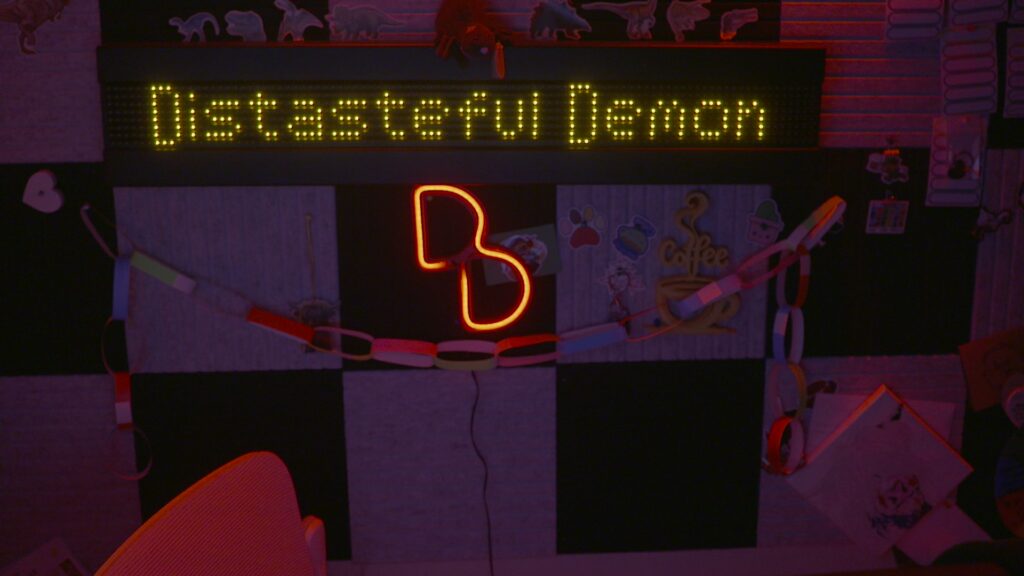
Building a professional streaming setup from the ground up.
In January 2025, I was asked to help build a practical studio setup for Twitch streaming. Drawing on my experience from Ionoco, Wey Valley Radio, Radio North Angus, and skills learned at college and volunteering with AODS, I designed and built a complete studio.
The studio features audience interaction lighting and LED sign control, video switching and key/media pool playout, multi-camera options, and flexible audio configurations.
Client
DistastefulDemon (Twitch)
Project Type
Full Studio Design & Build
Key Features
- Audience Interaction
- Video Switching
- Multi-Camera
- Custom Integration
Key equipment breakdown
Sony FS7
Cinema camera with XLR inputs and interchangeable lenses
Scarlett CM25 MkIII
Studio/vocal microphone for desk-based streaming
ATEM Mini Extreme
8x HDMI video switcher with encoding and streaming
RGB LED Par Cans (x3)
DMX-controlled lighting for set ambiance
QTX Flare1000 Hazer
Vertical hazer with RGB LED for effects
RPi + USB-DMX
Raspberry Pi with FTDI dongle for lighting control
Hanover 96x8 LED Display
Bus destination display for audience messages
Stream Decks
Mini, Mk1, and XL for comprehensive control
Zigbee Smart Plugs
Power automation and monitoring via Home Assistant
Software stack
Where possible I prefer to use FOSS software and give back to developers who put their hard work into these amazing tools.
OBS Studio
Media playout and chroma key
ATEM Software Control
Video switcher interface
BitFocus Companion
Control surface integration
Lumia Stream
Audience interaction triggers
QLC+
DMX lighting control software
OLA on RPi
ArtNet to DMX conversion
Custom Python Script
LED sign control with Hanover library
VoiceMeeter Potato
Audio routing and mixing
LoopMIDI
Virtual MIDI middleware
Home Assistant
Smart home and power integration
ATEM Mini Extreme
The obvious choice for the vision mixer was the Blackmagic Design ATEM Mini series. After trying to use the Mini Pro, I moved to the Extreme model for extra upstream keys needed for PIP camera and chroma key overlays.
- 8x HDMI inputs with 1080P60 at 10-bit depth
- Re-clocking on all HDMI inputs
- 4x Upstream Keys and 2x Downstream Keys
- On-board video encoding and streaming engine
- 2x USB-C for recording and webcam output
Sony FS-7 Camera
For the main camera I offered my Sony FS-7 as it supports XLR inputs with +48V phantom power, interchangeable lenses with PZ series support for remote focusing, full control over ISO, shutter angle, iris and white balance, and multiple output options including HDMI 1.4 and dual SDI 3G.
Flexible audio configuration
The Focusrite Scarlett CM25 MkIII studio/vocal mic provides excellent sound reproduction for the vocal range at a good price point. It connects directly to the Sony FS7 to send audio and video over a single cable to the video mixer.
On the ATEM there's a limiter to cut off sounds over -20dB as maximum target output, plus aggressive EQ to cut vibrations and movement in lower frequencies.
For mobile streams like cooking, DJI Mic 2 wireless microphones allow lapel or headset options connected to either the FS7 or directly to the ATEM.
DMX-controlled lighting
For lighting, I wanted DMX control for audience integration and compact size under 1kg and 40cm per light. RGB LED PAR style lights met both requirements with DMX control or manual override for fixed colors.
Control uses a Raspberry Pi Model B from 2012 running Open Lighting Architecture (OLA) to convert ArtNet to DMX via a FTDI USB-DMX cable. QLC+ lighting software sends ArtNet packets on a dedicated VLAN.
For the Halloween Spookathon, I added a QTX Flare 1000 vertical hazer with RGB LEDs for fire effects, all controlled via DMX.
Engaging viewers through hardware
LED Sign
Viewers can spend 200 bits (around £2) to display a custom message on a Hanover 96x8 LED display for 120 seconds. Custom Python code built around the Hanover library handles messages via a WebSocket app written in Go by Morranr for Twitch bot integration.
The script checks a blacklist of profanities and uses regex to catch creative spellings. Messages are timestamped and logged, with idle messages on rotation editable from a basic UI.
Chat Control
Subscribers and VIPs can change set colors via chat commands using Lumia Stream and LoopMIDI to talk to QLC+ and trigger preset scenes. During the Spookathon, followers and subscribers could trigger the hazer at different levels with timeouts to prevent visibility issues.
Twitch Events
Lumia Stream monitors specific events to trigger lighting effects like chasers or flashes, and display messages on the LED screen. Everything runs automatically using LoopMIDI and OSC to keep the screen and lights in sync.
Unified control surfaces
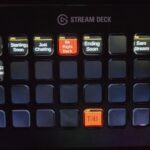
BitFocus Companion integrates all software and hardware functions into one place, mapped to Elgato Stream Decks. This allows complete control at different levels for both the streamer and myself as technical producer.
Home Assistant controls Zigbee smart plugs for power monitoring and automation. One Companion integration powers all supplemental equipment before going live.
Additional Features
HDMI to BaseT transmitters
UniFi networking with QoS
3D printed brackets & mounts
Custom lighting design
Merch webstore integration
Minecraft server plugins
Acknowledgments
A huge thank you to all the developers of the open source software used in this project. Special thanks to Morranr for the WebSocket integration and LA for help refining the Python script.
Interested in a similar project?